free, legal, superbly great.
that's how we spell coolness.
Showing posts with label Software - Mac. Show all posts

DoubleTwist offers a universal interface to manage photos, music and videos for most popular phones, gadgets and devices and the team continuously work on adding new ones. Sync iTunes playlists or podcasts to your BlackBerry, Sony PSP, Android G1, LG phones such as the Viewty and Shine, Sansa players.

DoubleTwist automatically recognizes your device and will perform any necessary video conversions to the native formats supported by your device. Sync video, photos, music and podcasts to your BlackBerry, PSP, Nokia, Sony Ericsson, LG, Windows Mobile, Archos, Android, Sansa and many other devices with ease.

Vision of this project is to create a unifying media platform that connects consumers with all their media and all their devices, regardless of whether they are online or offline.


Review by Jasmine France:


DoubleTwist is at its core a free music jukebox that offers content syncing to a variety of portable devices, including the BlackBerry, the PSP, and the iPod, as well as pretty much anything that can mount in Universal Mass Storage mode. One of the main draws of the program is that it can take your iTunes library and sync it to a variety of non-iPod players, an important feature for anyone who has ditched the ubiquitous device in favor of a music phone or other MP3 player.

In addition to acting as a music management app compatible with a variety of devices, the jukebox offers built-in support for Amazon MP3 Store purchases, which is in line with the company's goal to offer consumers choice when it comes to digital music management. Plus, the service includes a podcast aggregator for easily finding and subscribing to a variety of popular spoken-word content. More recently, DoubleTwist added an Android Market, which lets you browse apps and then use a bar code scanner to download them via your phone's camera. All of these features work incredibly well, though our praise for performance ends there.

We connected a variety of devices to DoubleTwist with varying results. It recognized our Sony Walkman effortlessly, though the time it took to sync just 150MB of content was excessive during testing. The program would not recognize our Motorola Droid as anything more than a generic USB device, and as such, we were unable to sync any media to the phone. Our other gripe has to do with music importing: the software imported multiple duplicates of nearly every song in our library, despite the fact they currently only live in one folder. This isn't a deal-breaker, but it does make the jukebox look unnecessarily cluttered.

DoubleTwist also incorporates automatic video transcoding for a lot of the supported devices, which is the feature that initially drew us to the software. However, the functionality is not without its pitfalls, such as the fact that the video transcoding--done during the syncing process--takes forever. Conversion speed was roughly two times the normal speed, so a 90-minute movie took 50 minutes or so to encode and transfer. Still, considering DoubleTwist offers this feature for free and integrates it so simply, we're willing to forgive the sluggishness.

Gripes aside, DoubleTwist delivers as advertised, and it certainly will be a useful solution for a lot of people. It offers a seamless connection with iTunes and lets users easily transfer that content to non-iPod devices. It also successfully converts video to a variety of formats suitable for whatever device is connected, and the process is invisible to the user, which makes it extremely straightforward--a lovely thing, considering the pain that is digital video formatting. Plus, the app includes integrated buttons for automatically publishing photos and videos to Flickr and YouTube.

DoubleTwist isn't without some flaws, but it gets the job done and it does it for free, so it's definitely worth checking out.

The Principles:
  • Universal. We are open to any device, content or network.
  • Playful. We always work so you can play.
  • Friendly. We believe using different devices, formats, or networks shouldn't ruin a good friendship.
  • Simple. We do not sacrifice ease of use as we let you do more.

Currently available for Windows, Mac and Android.
.

Angry IP scanner is fast and friendly network scanner for Windows, Linux, and Mac. It is very extensible, allowing it to be used for very wide range of purposes, with the primary goal of being useful to network administrators.

It can scan IP addresses in any range as well as any their ports. It is cross-platform and lightweight. Not requiring any installations, it can be freely copied and used anywhere.


Angry IP scanner simply pings each IP address to check if it's alive, then optionally it is resolving its hostname, determines the MAC address, scans ports, etc. The amount of gathered data about each host can be extended with plugins.

It also has additional features, like NetBIOS information (computer name, workgroup name, and currently logged in Windows user), favorite IP address ranges, web server detection, customizable openers, etc.

Scanning results can be saved to CSV, TXT, XML or IP-Port list files. With help of plugins, Angry IP Scanner can gather any information about scanned IPs. Anybody who can write Java code is able to write plugins and extend functionality of Angry IP Scanner.

In order to increase scanning speed, it uses multithreaded approach: a separate scanning thread is created for each scanned IP address. Please note that while theoretically Angry IP Scanner can be used by crackers, in fact it was not intended for doing so, thus the lack of stealth scanning methods. Please do not consider Angry IP Scanner as a 'hacktool' or something similar.


XBMC is an award-winning free and open source (GPL) software media player and entertainment hub for digital media. XBMC is available for Linux, OSX, Windows, and the original Xbox. Created in 2003 by a group of like minded programmers, XBMC is a non-profit project run and developed by volunteers located around the world. More than 50 software developers have contributed to XBMC, and 100-plus translators have worked to expand its reach, making it available in more than 30 languages.

While XBMC functions very well as a standard media player application for your computer, it has been designed to be the perfect companion for your Home Theatre PC. Supporting an almost endless range of remote controls, and combined with its beautiful interface and powerful skinning engine, XBMC feels very natural to use from the couch and is the ideal solution for your home theater.

Currently XBMC can be used to play almost all popular audio and video formats around. It was designed for network playback, so you can stream your multimedia from anywhere in the house or directly from the internet using practically any protocol available. Use your media as-is: XBMC can play CDs and DVDs directly from the disk or image file, almost all popular archive formats from your hard drive, and even files inside ZIP and RAR archives. It will even scan all of your media and automatically create a personalized library complete with box covers, descriptions, and fanart. There are playlist and slideshow functions, a weather forecast feature and many audio visualizations. Once installed, your computer will become a fully functional multimedia jukebox.

XBMC has a highly “skinnable” interface meaning that it can look radically different based on which “skin” is used. Confluence is used by default, so this is what will greet you upon install. You may wish to change the look to something more flashy, more artwork-based, etc. It’s up to you. 


Seashore is an open source image editor for Mac OS X's Cocoa framework. It features gradients, textures and anti-aliasing for both text and brush strokes. It supports multiple layers and alpha channel editing. It is based around the GIMP's technology and uses the same native file format.

However, unlike the GIMP, Seashore only aims to serve the basic image editing needs of most computer users, not to provide a replacement for professional image editing products. Seashore was created by Mark Pazolli who led the project until the end of 2009.


Seashore's features include:

  • Full support for the GIMP's native XCF file format
  • Read and write support for the TIFF, PNG, JPEG and JP2000 file formats
  • Read-only support for the BMP, PICT, PDF and XBM file formats
  • Layers with over 20 merging effects
  • Ability to edit just the primary or alpha channels
  • Thorough transparency effects including semi-transparent gradients
  • Arbitrary selection regions
  • Anti-aliased brush strokes
  • 6 basic gradient effects with 16 variations
  • Support for over 50 effects with CoreImage
  • Tablet support
  • ColorSync support (including embedded profiles in TIFFs and CMYK previewing)

Most features work on Mac OS 10.3.9 and later, with the exception of JP2000 support for which Mac OS 10.4 is required and CoreImage effects for which Mac OS 10.4 and a G4, G5 or Intel processor is required.


HandBrake is an open-source, GPL-licensed, multiplatform, multithreaded video transcoder, available for MacOS X, Linux and Windows.


Supported Sources:

  • Any DVD-like source: VIDEO_TS folder, DVD image or real DVD (unencrypted--protection methods including CSS are not supported internally and must be handled externally with third-party software and libraries), and some .VOB and .TS files
  • Most any multimedia file it can get libavformat to read and libavcodec to decode.

Outputs:

  • File format: MP4 and MKV
  • Video: MPEG-4, H.264, or Theora
  • Audio: AAC, CoreAudio AAC (OS X Only), MP3, or Vorbis. AC-3 pass-through, DTS pass-thorugh (MKV only)

Misc features:

  • Chapter selection
  • Subtitles
  • Integrated bitrate calculator
  • Picture deinterlacing, cropping and scaling
  • Live Video Preview


If you've ever thought about making professional-quality animations but decided not to because of the cost of the software, your excuse just got up and walked out the door. Blender is a free, open-source 3D rendering program that puts the power of the medium back into the hands of the artist.

What would you say to a free, open-source 3D program that had almost everything you could find in those expensive professional applications that cost hundreds, even thousands of dollars? It may sound too good to be true, but Blender 3D delivers amazing power at an unbeatable price.

Blender combines 3D modeling, rendering, animation, video sequencing, and game development in one application. It is also available on every major platform, meaning Mac, Windows, and Linux users can all work and play together with exactly the same tools.


Blender features a laundry list of animation essentials that can be broken down into categories: Interface, Modeling, Rigging, Rendering, Animation, UV Unwrapping, Shading, Physics and Particles, Imaging and Compositing, and Real Time 3D/Game Creation. The interface, though loaded with complicated tools, is remarkable for neither obscuring nor interfering with the image being worked on. A brief sampling of tools and functions includes 3D paint for vertex weighing, polygon meshes, 2D and 3D procedural brushes, edge rendering, textures, collision simulation, and support for around two dozen 2D and 3D file formats. Extras can be added with Python scripting, and since it's open source, many scripts can be easily found for download in the user forums.


Blender is not for the faint of heart. Learning to use it is time-consuming and best done by following the detailed tutorials available on the Blender Web site. There is also an extensive online Blender community, making familiarization with the app less painful--if not pain-free. However, none of these detracts from the overall experience or usefulness of the program, and we strongly recommend it for advanced users.


An Open Source vector graphics editor, with capabilities similar to Illustrator, CorelDraw, or Xara X, using the W3C standard Scalable Vector Graphics (SVG) file format.

Inkscape supports many advanced SVG features (markers, clones, alpha blending, etc.) and great care is taken in designing a streamlined interface. It is very easy to edit nodes, perform complex path operations, trace bitmaps and much more. We also aim to maintain a thriving user and developer community by using open, community-oriented development.

The main goal of Inkscape is to create a powerful and convenient drawing tool fully compliant with XML, SVG, and CSS standards. The guys over at Inkscape aim to maintain a thriving user and developer community by using open, community-oriented development.

inkscape-design-2The term Inkscape is made up of the two English words ‘ink‘ and ‘scape‘. Ink is a common substance for drawings, and is used when the sketched work is ready to be permanently committed to paper, and thus evokes the idea that Inkscape is ready for production work. A scape is a view of a large number of objects, such as a landscape or ocean-scape, and thus alludes to the object-oriented nature of vector imagery.

What is 'Scalable Vector Graphics'?

Scalable Vector Graphics (SVG) is an open, industry-standard XML-based format for vector graphics developed by the W3C. Its acceptance is growing fast. Most vector editors these days can import and export SVG, and modern browsers (such as Firefox and Opera) can display it directly, i.e. without requiring any plugins. (For Internet Explorer, there's an SVG Viewer plugin from Adobe.)


Is Inkscape ready for regular users to use?

Yes! While Inkscape does not have all the features of the leading vector editors, the latest versions provide for a large portion of basic vector graphics editing capabilities. People report successfully using Inkscape in a lot of very different projects (web graphics, technical diagrams, icons, creative art, logos, maps). For example, thousands of images on Wikipedia are created_with_Inkscape, as is the majority of the content on openclipart; many examples of Inkscape art can be seen here and here. We try to always keep the codebase usable for real users, as we believe that a tight iteration cycle between users and developers will give best results. You can start using Inkscape alongside your other tools now!

What platforms does Inkscape run on?

Binary packages for Linux, Windows 2000/2003/XP (fully self-contained installer), and OSX (dmg package) are provided. We know that Inkscape is successfully used on FreeBSD and other Unix-like operating systems. Note that Windows 98/ME is no longer supported.


GnuCash is the leading GPL'ed Desktop Financial Manager Application. Appropriate for personal and small business use, it is meant to be easy to use and full of features. It is a free and open source accounting software program that implements a double-entry bookkeeping system. It was initially aimed at developing capabilities similar to Intuit, Inc.'s Quicken application, but also has features for small business accounting. Recent development has been focused on adapting to modern desktop support-library requirements.

GnuCash is part of the GNU Project, and runs on Linux, OpenBSD, FreeBSD, Solaris, Mac OS X, other Unix-like platforms, and even on Windows.


Designed to be easy to use, yet powerful and flexible, GnuCash allows you to track bank accounts, stocks, income and expenses. As quick and intuitive to use as a checkbook register, it is based on professional accounting principles to ensure balanced books and accurate reports.

Despite the overall simplicity of using the program, the sheer number of terms and actions may require a dictionary for some people. Fortunately, GnuCash has an excellent tutorial that outlines not only the program, but also financial terminology as well. And novice users will appreciate the wizard that walks you through the setup process.


From Publisher:

  • Secure your web session with HTTPS encryption.
  • Hide your IP address for your privacy online.
  • Access all content privately without censorship; bypass firewalls.
  • Protect yourself from snoopers at Wi-Fi hotspots, hotels, airports, corporate offices and ISP hubs.
  • Works on wireless and wired connections alike.
  • Secure your data & personal information online.

Hotspot Shield protects your entire web surfing session; securing your connection at both your home Internet network & Public Internet networks (both wired and wireless). Hotspot Shield protects your identity by ensuring that all web transactions (shopping, filling out forms, downloads) are secured through HTTPS. Hotspot Shield also makes you private online making your identity invisible to third party websites and ISP’s. Unless you choose to sign into a certain site, you will be anonymous for your entire web session with Hotspot Shield. We love the web because of the freedom that it creates to explore, organize, and communicate. Hotspot Shield enables access to all information online, providing freedom to access all web content freely and securely. Secure your entire web session and ensure your privacy online; your passwords, credit card numbers, and all of your data is secured with Hotspot Shield. Standard antivirus software protects your computer, but not your web activities.

Hotspot Shield creates a virtual private network (VPN) between your laptop or iPhone and our Internet gateway. This impenetrable tunnel prevents snoopers, hackers, ISP’s, from viewing your web browsing activities, instant messages, downloads, credit card information or anything else you send over the network. Hotspot Shield security application is free to download, employs the latest VPN technology, and is easy to install and use.

In summary, you can:
  • Access all of your favorite content privately
  • Secure your web session with HTTPS encryption
  • Hide your IP address for your privacy online
  • Protect yourself from snoopers at Wi-Fi hotspots, hotels, airports, corporate offices and ISP hubs.
  • Secure your data & personal information online

Hotspot Shield runs on:

  • Windows Vista
  • Windows XP
  • Windows 2000
  • Mac OS X (10.5 Leopard)
  • Mac OS X (10.4 Tiger)


Introduction


With PC Tools iAntiVirus™ you are protected against the most nefarious cyber-threats attempting to gain access to your Mac and personal information.

Once your computer has been infected, a virus or worm will usually attempt to spread itself to your friends, family and associates by accessing your email contacts and networked PCs. The infection may also allow hackers to access files on your Mac, use it to launch attacks against other computers and websites or to send mass SPAM email.

PC Tools iAntiVirus™ provides real-time protection and comprehensive system scanning to ensure your Mac remains safe and virus free.

Protection against Mac specific threats

The iAntiVirus™ database has been designed from the ground up to detect and remove Mac specific threats. This enables a high level of protection whilst keeping memory footprint and resource usage at a minimum. The iAntiVirus™ database is not cluttered with signatures for Windows specific threats which your Mac is immune against.

Simple to use

iAntiVirus™ has been designed with the user in mind. The user interface is purely functional, making it simple to scan for, remove and manage infections.


Features :


A variety of scan options

You may perform a variety of scan types using iAntiVirus™, this allows you to strike a balance between the time taken to complete a scan, and its thoroughness.

Real-time protection

IntelliGuard protects your Mac against infections in real time. Whenever an infection is detected and blocked, an alert is displayed below the system menu bar. IntelliGuard automatically places detected infections in quarantine, works silently in the background and uses minimal system resources.

Quarantine

iAntiVirus™ quarantines all detected infections, allowing you to easily view and restore items in the case of a false positive (for example: when scanning with engine heuristics set to high).

Automatic Smart Updates

Frequent updates to detect and guard computers against new threats and viruses as well as provide enhancements to iAntiVirus™ are automatically installed and downloaded through the Smart Update function. Threat signatures are updated within hours of a high risk malware outbreak to protect you from the latest online threats.

Low resource usage

When in monitoring mode iAntiVirus™ has been designed to work silently in the background, threats are blocked and removed without any system impact, while only a small alert window is displayed to advise you that your Mac has been protected against an attack.


Download it Now

From Softpedia :

The GIMP is the GNU Image Manipulation Program. It is a freely distributed piece of software for such tasks as photo retouching, image composition and image authoring. The Gimp works on many operating systems, in many languages. It has many capabilities. It can be used as a simple paint program, an expert quality photo retouching program, an online batch processing system, a mass production image renderer, an image format converter, etc. GIMP is expandable and extensible. It is designed to be augmented with plug-ins and extensions to do just about anything. The advanced scripting interface allows everything from the simplest task to the most complex image manipulation procedures to be easily scripted.

Features:

� Full suite of painting tools
� Sub-pixel sampling for all paint tools for high quality anti-aliasing
� Extremely powerful gradient editor and blend tool
� Supports custom brushes and patterns
� Full alpha channel support
� Layers and channels
� Multiple Undo/Redo (limited only by diskspace)
� Editable text layers
� Transformation tools including rotate, scale, shear and flip
� Selection tools including rectangle, ellipse, free, fuzzy and intelligent
� Advanced path tool doing bezier and polygonal selections.
� Transformable paths, transformable selections.
� Quickmask to paint a selection.


#


Download it Now


LimeWire is the world's fastest P2P file-sharing application for all types of computer files, including music, video, pictures, games, and text documents. Other features include dynamic querying, file previews during download, advanced techniques for locating rare files, and an easy, clean user interface.

LimeWire's new spam blocker gets rid of junk results, and automatic updates will keep you sharing faster than ever with the latest version. You can search for Creative Commons and Weedshare licensed files, and publish your own creative works with Creative Commons licensing. LimeWire continues its guarantee of no adware or spyware. Includes a built-in bittorent support.


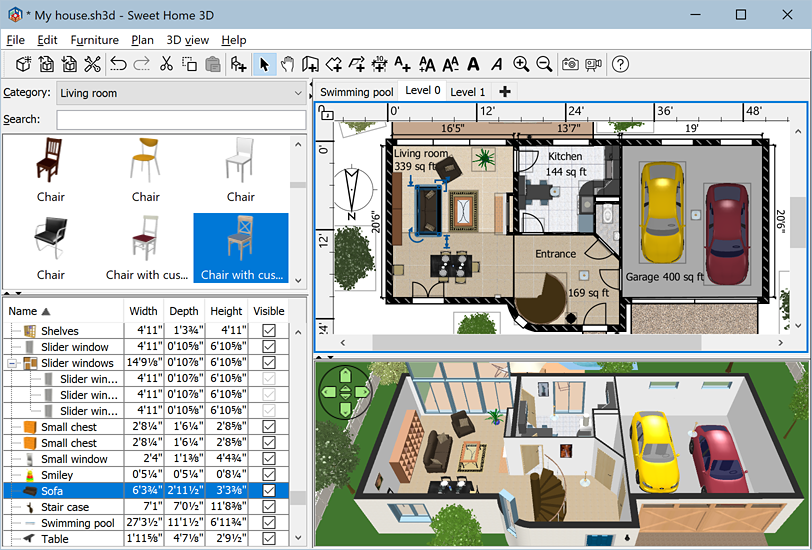
Sweet Home 3D is a free interior design application
that helps you place your furniture on a house 2D plan, with a 3D preview. Sweet Home 3D is an open source project available on SourceForge.net
and distributed under GNU General Public License.

Download it Now (Windows)
Download it Now (Mac)
Download it Now (Linux)


Main features

  • Unlimited operators, chats, and users
  • Priority queue of visitors
  • Chat button for email signatures
  • Differing buttons on same website
  • English and russian are supported
  • Reconnect automatically if the internet connection went down

Chat window

  • Agent and visitor "Typing Indicator"
  • Agent photo
  • Chat transcript emails
  • Sound and Visual alerts
  • "Leave a message" when you are away
  • Customize chat with your Logo, Name etc.
  • Unicode support for multiple languages
  • Quickly convert text to hyperlinks in chat
  • Not blocked by pop-up blockers

Operator abilites

  • Web-based Operator Console
  • Canned messages for speed and consistency
  • Track where your visitors clicked from to get to your website (refer URL)
  • Chat conversation history with search
  • Linking to previous visits, instant access to previous chats
  • Reassign/Transfer chat ownership
  • Mark/Highlight nuisance visitors
  • Administrator can view active chats
  • Information about visitor: first message, address, browser
  • Administrator can take over the chat

Server requirements

  • A webserver or web hosting account running on any major Operating System
  • PHP (5.x and above) with MySQL support
  • MySQL 5.0 and above

Supported browsers

  • Microsoft Internet Explorer 5.0+
  • Mozilla Firefox 1.0+
  • Mozilla 1.4, 1.7
  • Opera 7.0+
  • Safari 1.2.5+
  • Netscape 6.0+
  • Google Chrome 0.2.149.29+
  • iPhone 1.1.4+

From Publisher :

VLC media player is a highly portable multimedia player for various audio and video formats (MPEG-1, MPEG-2, MPEG-4, DivX, mp3, ogg, ...) as well as DVDs, VCDs, and various streaming protocols.
It can also be used as a server to stream in unicast or multicast in IPv4 or IPv6 on a high-bandwidth network.
It doesn't need any external codec or program to work.


Download it Now (Windows)

Download it Now (Mac)

Download it Now (Linux)


From Publisher :

XnView
is an utility for viewing and converting

graphic files.


It has the features :


* Multipage TIFF, Animated GIF, Animated ICO support
* Image IPTC, EXIF metadata support
* EXIF auto rotation support
* IPTC editing
* Resize, rotate, crop support
* Lossless rotate & crop (jpeg) support
* Adjust brightness, contrast...
* Auto levels, contrast
* Modify number of colors
* Apply filters (blur, average, emboss, ...)
* Apply effects (lens, wave, ...)
* Fullscreen mode
* Slide show with effects
* Batch convert, batch rename
* Create WEB page easily
* Screen capture
* Create contact Sheet
* Create or edit Multi-page file (TIFF, DCX, LDF)
* TWAIN & WIA support (Windows only)
* Print support (Windows only)
* Drag & Drop support (Windows only)
* Compare image side by side
* Filmstrip layout
* 44 languages support (Windows only)


No longer a fledgling upstart, Firefox 3 is full-featured, lightning fast, and an able Safari foe. Previous versions have seen Mozilla's approach to features such as tabbed browsing and extensions become extremely popular. Even though Firefox 3 lacks a killer feature, it offers significant improvements not to be missed.

Version 3 introduces a multitude of safety and usability features. The location bar drop-down menu now includes URLs from both your browsing history and your bookmarks. A new Add-Ons manager includes a built-in plug-in search engine, saving you the previous trip to the Mozilla Web site. Single-click the star icon on the right of the location bar to bookmark the current page, or double-click on it to simultaneously add and edit the bookmark entry. You can tag bookmarks, too. Other impressive new features include password confirmation before adding it to the saved passwords list, the ability to pause and resume downloads, and merged forward and backward history lists.

Firefox 3 now runs faster and, according to Mozilla, is less susceptible to hacks and other vulnerabilities. The browser now warns your system's antivirus program when you download a file, and anti-phishing utilities automatically give you a warning page before allowing Firefox to load risky sites. The favicon reveals Web sites' ownership details and displays the security level of your connection to that site.

Developers will appreciate that Firefox 3's new graphics and text rendering code provide rendering improvements in CSS and SVG as well as improved display of fonts and complex scripts. Firefox 3--still open-source, as ever--is a browser that all users should consider making their default Web-surfing tool.


Download it Now (Choose Mirrors)

Instant Download

Opera 9.62 maintains the program's tradition of striving for the fastest, smallest, and most full-featured browser available. Opera covers the basics with tabbed browsing, mouse-over previews, a customizable search bar, advanced bookmarking tools, and simple integration with e-mail and chat clients. Mouse-gesture support, keyboard shortcuts, and drag-and-drop functionality round out the essentials.

Opera's extras push it to the top of the class. Integrated theme support previews themes from within the interface, and the new version sports a default redo that's an attractive balance between "dark" and "light" themes. Opera's desktop widgets can appear anywhere while Opera is running. The Wand utility combines autofill with saved passwords, and it's hard to ignore the addition of torrent support and real-time fraud protection. The latest version includes reasonable anti-malware protection courtesy Haute Secure.

The expanded features in 9.62 should make any non-believer do a double-take. Opera Link enables Bookmarks, the Personal bar, Speed Dial, and Notes synchronization across all other Opera instances. Quick Find improves the search tool, allowing for full text searching from the address field, the history panel, and opera:historysearch. The Status bar has been restored as a default, the Wand now lets users confirm a successful login before saving credentials, and spatial navigation--similar to Opera Mini and the Wii browser--has been introduced.

Download it Now (Choose Mirrors)


GCompris is an educational software which propose different activities to children from 2 to 10 years old.

(JPEG)

GCompris is an educational software suite comprising of numerous activities for children aged 2 to 10. Some of the activities are game orientated, but nonetheless still educational. Below you can find a list of categories with some of the activities available in that category.

> computer discovery: keyboard, mouse, different mouse gesture, ...
> algebra: table memory, enumeration, double entry table, mirror image, ...
> science: the canal lock, the water cycle, the submarine, electric simulation ...
> geography: place the country on the map
> games: chess, memory, connect 4, oware, sudoku ...
> reading: reading practice
> other: learn to tell time, puzzle of famous paintings, vector drawing, cartoon making, ...

Currently GCompris offers in excess of 100 activities and more are being developed. GCompris is free software, that means that you can adapt it to your own needs, improve it and, most importantly, share it with children everywhere.

Download it Now (Windows)

Download it Now (Mac)


(Requires Mac OS X 10.3 or later)

Recipe4mac recipe browser

Recipe4mac lets you navigate through thousands recipes from the Recipe4all.com database with a neat Mac interface. Visually resembling the Safari browser Recipe4mac allows you search recipes by keywords, by ingredients or by geography. It also has direct access to the glossary. With a single click you can see the same recipe or listing in your default web browser.

Notice: Recipe4mac requires Internet connection to operate!

only search moneylessMAX