free, legal, superbly great.
that's how we spell coolness.
Showing posts with label File and Disk Management. Show all posts

DoubleTwist offers a universal interface to manage photos, music and videos for most popular phones, gadgets and devices and the team continuously work on adding new ones. Sync iTunes playlists or podcasts to your BlackBerry, Sony PSP, Android G1, LG phones such as the Viewty and Shine, Sansa players.

DoubleTwist automatically recognizes your device and will perform any necessary video conversions to the native formats supported by your device. Sync video, photos, music and podcasts to your BlackBerry, PSP, Nokia, Sony Ericsson, LG, Windows Mobile, Archos, Android, Sansa and many other devices with ease.

Vision of this project is to create a unifying media platform that connects consumers with all their media and all their devices, regardless of whether they are online or offline.


Review by Jasmine France:


DoubleTwist is at its core a free music jukebox that offers content syncing to a variety of portable devices, including the BlackBerry, the PSP, and the iPod, as well as pretty much anything that can mount in Universal Mass Storage mode. One of the main draws of the program is that it can take your iTunes library and sync it to a variety of non-iPod players, an important feature for anyone who has ditched the ubiquitous device in favor of a music phone or other MP3 player.

In addition to acting as a music management app compatible with a variety of devices, the jukebox offers built-in support for Amazon MP3 Store purchases, which is in line with the company's goal to offer consumers choice when it comes to digital music management. Plus, the service includes a podcast aggregator for easily finding and subscribing to a variety of popular spoken-word content. More recently, DoubleTwist added an Android Market, which lets you browse apps and then use a bar code scanner to download them via your phone's camera. All of these features work incredibly well, though our praise for performance ends there.

We connected a variety of devices to DoubleTwist with varying results. It recognized our Sony Walkman effortlessly, though the time it took to sync just 150MB of content was excessive during testing. The program would not recognize our Motorola Droid as anything more than a generic USB device, and as such, we were unable to sync any media to the phone. Our other gripe has to do with music importing: the software imported multiple duplicates of nearly every song in our library, despite the fact they currently only live in one folder. This isn't a deal-breaker, but it does make the jukebox look unnecessarily cluttered.

DoubleTwist also incorporates automatic video transcoding for a lot of the supported devices, which is the feature that initially drew us to the software. However, the functionality is not without its pitfalls, such as the fact that the video transcoding--done during the syncing process--takes forever. Conversion speed was roughly two times the normal speed, so a 90-minute movie took 50 minutes or so to encode and transfer. Still, considering DoubleTwist offers this feature for free and integrates it so simply, we're willing to forgive the sluggishness.

Gripes aside, DoubleTwist delivers as advertised, and it certainly will be a useful solution for a lot of people. It offers a seamless connection with iTunes and lets users easily transfer that content to non-iPod devices. It also successfully converts video to a variety of formats suitable for whatever device is connected, and the process is invisible to the user, which makes it extremely straightforward--a lovely thing, considering the pain that is digital video formatting. Plus, the app includes integrated buttons for automatically publishing photos and videos to Flickr and YouTube.

DoubleTwist isn't without some flaws, but it gets the job done and it does it for free, so it's definitely worth checking out.

The Principles:
  • Universal. We are open to any device, content or network.
  • Playful. We always work so you can play.
  • Friendly. We believe using different devices, formats, or networks shouldn't ruin a good friendship.
  • Simple. We do not sacrifice ease of use as we let you do more.

Currently available for Windows, Mac and Android.
.


    Features:
  • * Cleaning of all user temp folders, administrator only can use this feature.
  • * Cleaning of the Java cache, which seems to be harbouring more and more malware.
  • * Cleaning for the Opera browser, including Operas cache, cookies, history, download history, saved passwords and visited   links.

Benefits :
* Very light-weight
* User-friendly software
* No install required!


Areca Backup is an Open Source backup solution

It basically allows you to select a set of files / directories to back-up, choose where and how (as a simple file copy, as a zip archive, ...) they will be stored, and configure post-backup actions (like sending backup reports by email or launching custom shell scripts)

It has been designed to :
  • Be as simple as possible to set up : No complex configuration files to edit - Your backup configuration (which is stored as an XML file) can be edited with Areca's graphical user interface.
  • Be as versatile as possible : Areca can use advanced backup modes (like "delta backup") or simply produce a "basic" copy of your source files as a standard directory or zip archive (readable by WinZip or other archivers).
  • Allow you to interact with your archives and the files they contain : Track different versions of a specific file, browse your archives, recover or view specific files, merge a set of archives, ...


The Defraggler helps computer users who feel their system is running too slow. This simple program performs a complicated task that streamlines your PC's thought processes, but be prepared for a wait.

This free unlimited download attempts to bring order to your scattered RAM. When a file is created, portions of the item are spread into free spaces throughout the hard drive. As more files accumulate the computer has to work harder to piece together the puzzle that has become your specific file. This results in a slow computer. Defragmenting seeks out all these matching pieces and lines them up, making work easier and faster for the computer.

Defraggler downloads easily and is simple to understand. Its display shows users how much memory is available on their computers and also performs a search to show exactly how many files are fragmented in the entire computer. From here you can choose to defragment all or select specific files for defragmentation. Experts recommend regular defragmentation to keep computers running smoothly, so the Defraggler offers a scheduler to automatically run the program.

Defraggler is easy to understand and performs its job well. There is a strange chart along the top that seems to move for no real reason and is best ignored, but is only a minor annoyance. In addition, be prepared for a long wait time. Defragmenting a computer can take dozens of minutes. Still, if you want to improve computer performance, this is a great place to start.


Download it Now


Portinho is an optimization suite for Windows. It can be used to clean your system (useless files, borken shortcuts, registry, history, etc.), tweak it (the operating system, memory, or connection) or diagnose it (information about the computer, HDD and fonts).

Words by author:

Folder Guide is a free handy utility that provides fast access to your frequently used and favorite folders. It can operate as the part of your context menu in your Windows Explorer.

After quick install it will appear in context menus of Windows Explorer and Open/Save dialogs as "Folder Guide" item. With Folder Guide, you no longer need dozens of mouse clicks to navigate to your desired folder. Now reach your favorite folders in just 2 mouse clicks. Select from right click menu "Folder Guide" then click on your desired folder. Folder Guide runs automatically as part of the Windows Explorer context menu, so you will never need to start the program otherwise you want to edit the list of folders. It also works from the desktop, the Start button.


Features:

• Quick access folders in Open/Save As/Browse dialogs.
• Quick access folders in Windows Explorer and the desktop and the Star button.
• Easy to add folder to the list of "Folder Guide".
• Easy to edit or reorder folders in the list of "Folder Guide".
• Runs automatically as part of the context menu.


CPU-Z is a freeware utility that gathers information on some of the main devices of your system. CPU-Z does not need to be installed, just unzip the files in a directory and run the .exe. In order to remove the program, just delete the files and that's it. The program does not copy any file in any Windows directory, nor write in the registry.

CPU

  • Name and number.
  • Core stepping and process.
  • Package.
  • Core voltage.
  • Internal and external clocks, clock multiplier.
  • Supported instructions sets.
  • All cache levels (location, size, speed, technology).

Mainboard

  • Vendor, model and revision.
  • BIOS model and date.
  • Chipset (northbridge and southbridge) and sensor.
  • Graphic interface.

Memory

  • Frequency and timings.
  • Module(s) specification using SPD (Serial Presence Detect) : vendor, serial number, timings table.

System

  • Windows and DirectX version.


Program Summary:

CCleaner is a freeware PC optimization tool.
It combines a system cleaner that removes unused and temporary files from your system and also a fully featured registry cleaner!
CCleaner allows Windows to run faster, more efficiently and gives you more hard disk space.
The best part is that it's Small, Fast and Free!

Cleans the following Windows components:

  • Internet Explorer
    - Temporary File Cache
    - URL History
    - Cookies
    - Hidden Index.dat files
    - Last download file location
  • Firefox
    - Temporary File Cache
    - URL History
    - Cookies
    - Download manager
  • Google Chrome
  • Opera
  • Safari
  • Recycle Bin
  • Clipboard
  • Windows Temporary files
  • Windows Log files
  • Recent Documents (on the Start Menu)
  • Run history (on the Start Menu)
  • Windows XP Search Assistant history
  • Windows XP old Prefetch data
  • Windows memory dumps after crashes
  • Chkdsk file fragments

Advanced Options allow cleaning of:

  • Menu Order cache
  • Tray Notifications Cache
  • Window Size and Location Cache
  • User Assist history
  • IIS Log Files
  • Custom Folders

Application Cleaning:

As well as cleaning up old files and settings left by standard Windows components, CCleaner also cleans temporary files and recent file lists for many applications. Including:
  • Firefox, Opera, Safari, Media Player, eMule, Kazaa, Google Toolbar, Netscape, Microsoft Office, Nero, Adobe Acrobat Reader, WinRAR, WinAce, WinZip and more...

Registry Cleaning:

CCleaner uses an advanced Registry Cleaner to check for problems and inconsistencies. It can check the following:
  • File Extensions
  • ActiveX Controls
  • ClassIDs
  • ProgIDs
  • Uninstallers
  • Shared DLLs
  • Fonts
  • Help File references
  • Application Paths
  • Icons
  • Invalid Shortcuts and more...

Safety:

CCleaner was designed from the ground to be safe and secure to use. It has multiple levels of checks in place to ensure that it cannot delete any useful information or documents you may still need. We also certify that it contains no Spyware or Adware.

High Security:

For the super cautious users we also offer secure file erasing. By overwriting the files before deleting them, making it impossible to recover the data.

Multiple Languages:

Thanks to the translators, CCleaner is available in 35 different languages:

English, Albanian, Arabic, Bosnian, Bulgarian, Catalan, Chinese (Simplified), Chinese (Traditional), Czech/Slovak, Danish, Dutch, Finnish, French, Galician, German, Greek, Hebrew, Hungarian, Italian, Japanese, Korean, Lithuanian, Macedonian, Norwegian, Polish, Portuguese, Portuguese (Brazilian), Romanian, Russian, Serbian Cyrillic, Serbian Latin, Slovak, Spanish, Swedish and Turkish.


Key Features

Dual Window:

· To be multi-tasking, it's essential. So many tricks can be done when dual window is on.
· Use hotkey to change window proportion.

Tabs:
· Exp+ allows you to open multiple tabs, no matter folder tabs or web pages.
· Tabs can be moved freely between windows.
· Drag & drop subfolders to the tab bar to open them

Group:
· You can not only set related folders and web pages as a group, but also send files to a group.
· While setting, you can config any tab as auto-locked, or a web page as auto-refreshed with preferable frequency.

Smart Use of Mouse:
· Making good use of dual-window mode, you can right-click or left-click to open folder, favorite, or group to the left or right window.

Floating Navigation Window:
· Includes some tabs, such as "Desktop", "Favorites", and "Backup Files Previewer".
· Backup Files Previewer allows you to preview the content of file before restore it.
· Special floating design grants you the best flexibility.

Customize Toolbars:
· Command Bar
· Function Key Bar
· Auto-detect whether folder tab or web page a tab is, then display corresponding Function Key Bar.
Search Toolbars:
· Right-click to switch between "File Search Toolbar" and "Web Search Toolbar".

Multi-Language Pack:
· The Language pack of Exp+ is extensible. Currently, It includes 8 languages, including English, Traditional Chinese, Simplified Chinese, Spanish, French, German, Italian, and Portuguese.
· In Exp+, you can configure the UI language to any other available language.

Exp+ Start Page:
· Including three parts: "My Computer", "Groups" and "Last Unclosed Tabs". Each part contains a link list, each link represents a shortcut for you.

Powerful File Compressor:
· Support Unicode
· Exp+ can handle non-English file names, thus, file exchange won't be troublesome at all.
· You can extract compressed files of ZIP, RAR, or JAR format.

Move and Copy Files:
· Based on dual-window mode, moving files or copying files becomes the easiest job ever. By using hotkey, files can be moved or copied between windows in a blink.

Floating Buttons:
· For Folder
· You can rapidly open folder by clicking on Floating Buttons Bar at Type column.
· For File
· A floating button of File Content Previewer at Type column offers another access to preview a file content.

Image Previewer:
· Whenever the cursor is moved onto an icon of image file, the image will be instantly shown in a floating auto-size window. This is for you to rapidly scan through a large number of image files.

Add Your Own Search Engines:
· You can add a new search engine to search engine list of your own. Whenever a search job is executed, search engines will be activated at the same time.

Drag and Drop a Link:
· Whenever you want to open a link in a web page, simply drag and drop to the window you prefer.

Web Page e-Mailer:
· Instantly e-mail any web page to a friend along with message.

One-time setting of SMTP:
· Simply setup server address (e.g. smtp.gmail.com), account and password etc.

Fast Start Genie:
By using this universal shortcut manager, It's very simple to start any Windows app. Just do one of the following:
· Use configurable hotkey
· Click on self-defined Fast Start Bar button
· Type self-defined alias

Quick Shutdown Tool:
· This tool is the greatest alternative of Windows commands, include Shutdown, Hibernate, Log off, Restart, and Standby.

Boss Key:
· Wherever you are, you are as free as at home. When someone approaches you, keystrokes help you to disguise.


  • What is Quicksys RegDefrag?
It's a freeware utility to defrag registry. Quicksys RegDefrag is small, clear and easy. Registry data is constantly being written to and removed during a normal Windows operation. Over time this data becomes fragmented.

  • What does this software do?
Quicksys RegDefrag optimizes your registry by removing gaps, fragments and wasted space in Windows registry files. The program does not modify any registry entries.

  • Benefits?
Of course! The defragmentation improves performance and boosts access to the registry.

  • I understand, but what is Registry?
The registry is the database of information that stores all of the setup, user preferences, software and hardware configuration information. It's vital to the proper execution of Windows.

  • How much does it cost?
It's free.


Quicksys DiskDefrag is high technology freeware software that aims to rearrange the fragments of files on disk, to be continuously and in order, so that the performance and search speed of the disc increases. Besides defragmenting the disk, Quicksys DiskDefrag has a system called QSICA (Quicksys Intelligent Clusters Allocation) for clusters optimization.


Main Features

* It supports formatting NTFS (New Technology File System), FAT16 (File Allocation Table) and FAT32.
* Defragments the files on disk.
* Optimizes the files on the disk using the technology QSICA.
* Works on any type of removable disk - floppy disks, USB (pen-drives), memory cards and so on.
* Defragmentation of files separately. You can choose to defragment a single file.
* There is a minimal possibility of file corruption to occur due to technology (99.9% confidence).
* Multi-languages.

Additional Features

* Search for all system files, MFT (Master File Table), bitmaps and list of attributes.
* Search for reparse points.
* Search for files and their position in the clusters.
* Size of block clusters customizable.
* There is possibility to ignore large files.
* Cluster-viewer. You can check the fragments of files in each cluster. Simply click the desired cluster.
* Show detailed information about the partitions.

Benefits

* Increase in performance in the access of files.
* Reduction of time needed to boot the computer.
* Increase the life span of disk.
* Maximum prevention fragments of files due to new technology QSICA.


Minimum Requirements

* Windows® 2000, 2003, XP, Vista, 2008 and Seven.
* Windows 32-bit and Windows 64-bit.
* Processor 300 MHz.
* 3 MB free disk space.
* 128 MB RAM


wxCommander application is a new two-panel file manager. It comes with a few unique features (iso, a great text editor) and is built to last, created with the best software development tools available.

wxCommander will compress (and browse and decompress) these archive formats:

· zip (compressed archive)
· zip with password protection (encrypted + compressed archive)
· zip self-extracting archive (compressed .exe)
· iso (uncompressed cd-rom mastering/image format with Unicode filenames)
· iso.zip (single pass iso encoding + zip comprssion)
· gz (compressed single file archive)
· tar (uncompressed file archive)
· tar.gz (compressed file archive)
· bz2 (compressed single file archive)
· tar.bz2 (compressed file archive)
· rar (compressed file archive - read only)


Review from Softpedia :

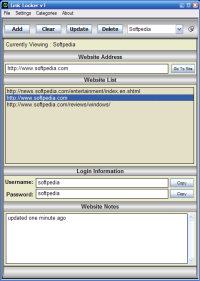
Link Locker is not a regular bookmark manager and does not look like one. Its main advantage is that it comes free of charge and there are no bugs to be fixed in this version. The interface is nice and clean and the only drawback here is that it will not be displayed in the taskbar like all the regular applications. Minimizing it will be made in the system tray instead.

The application window is divided into several sections meant to quicken the view of information appended to the URLs. You will be displayed the category you are currently looking into, the website list containing all the links the user introduced and towards the lower end there is the additional information (Login Information and Website Notes).

All the information appended can be safe kept by Link Locker and, due to the password protection provided, you will be able to keep prying eyes from snooping around.

In the right hand upper corner of the application window there is the categories bar. The default option is Quickpick. However, you can always add more categories and name them according to the web links they shelter. Deleting a category is as easy as going into the Categories menu and choosing "Delete Category" option.

After entering the website link you can add the extra information by selecting the link and after appending all there is, clicking the "Update" button. Otherwise, the information will be lost as soon as you select another link in the list. No matter how rudimentary the application may seem to some of you, you can always open a certain link in the default browser by pressing one button ("Go To Site").

To secure the links no matter what happens to the program the user can make use of the backup and restore functions available. The backup database will be placed in a user defined folder and can be loaded whenever it is necessary. The backup file is practically a ZIP archive containing the database. The password is saved separately in the same folder as the executable.

Actually, this software is currently not more distributed by its publisher. We at moneylessMAX dont know why, but this software is really useful and we managed to find an external link for this.

WinRAR is a 32-bit Windows version of RAR Archiver, an archiver and archive manager. RAR files can usually compress content by 8 percent to 15 percent more than ZIP files can. WinRAR's main features include strong general and multimedia compression, the ability to process non-RAR archive formats, ZIP compression and decompression, support for long filenames, programmable self-extracting archives (SFX), repair of damaged archives, authenticity verification, embedded file comments, and encryption. Unicode is supported in archive filenames, allowing non-English filenames to be handled painlessly. You can manipulate the parameters of many archives at once and view a volume sequence as a single archive. WinRAR can convert other archive formats to RAR and search for specified text and files in archives. This WinRAR is not really a freeware, but a shareware. But, because its functions are not restricted even after the free period, we still include it in moneylessMAX.


As Partition Magic alternative, EASEUS Partition Manager is a comprehensive hard disk partition management software for Windows 2000/2003 Server and Windows 2000/XP/Vista partition to Resize and Move, Create, Delete and Format, Hide and Unhide server and non server partitions and much more.


People divided EASEUS Partition Manager as Partition Magic Alternative, actually, EASEUS Partition Manager has overtaken Partition Magic for a big step. You can create, delete, format partitions on your hard disk quickly and easily. The most attractive feature is that it can resize/move your partitions by using the free spaces without destroying data.

One extremely important feature of the application is that it can resize partitions even if they are populated with data, without creating any problems and keeping the files intact. The app is designed to work with any type of Windows file system, from FAT12, FAT16 and FAT32 to NTFS, but the limitation for the size of hard disks supported is set to 1TB. And considering that data storage devices keep increasing in capacity, it would be a great idea to adapt the software to the new conditions. On the upside, Easeus Partition Manager Server can handle up to 32 hard disks, which makes it a good choice for server systems.

Working with the application should be piece of cake regardless of your computer skills. It is actually a matter of right clicking on the desired partition and choosing one of the options available. You can resize drives (shrink or enlarge) according to the unallocated space available near them. In order to set the new size, all you have to do is either drag it from one side of the drive map or, if a more accurate size is needed, you can type in the value in MB yourself.

A very clever option is the possibility of moving a partition someplace else on the physical disk so that you can distribute the unallocated space to other drives as well (simply play with the values for unallocated space before and after). An easier way to do this is by simply clicking the partition and sliding it through the unallocated space.

But Easeus Partition Manager Server can be used for a little more than organizing your partitions on the disk and formatting or labeling them. You can also use the software to hide drives from view. Hidden drives will not be visible (or accessible) from Windows OS even if you boot in Safe Mode, but under Linux the data on them is completely unprotected from prying eyes.

Still, in the Advanced section of the application you can run a bad sector test to see if everything is A-OK or call on Windows CHDISK utility to check for errors on disk and fix them. This section also gives you the possibility to change a drive letter, but this can also be easily achieved directly from Windows, be it XP or Vista.

All in all, the application does a great job if run on XP as it offers a handful of options for partitioning your disks as well as a comfortable, straightforward and easy to use interface. Used on Vista, however, Easeus Partition Manager Server is not as necessary as this windows envinronment brings its own artillery to deal with disk partitioning and almost all the options are included. Nevertheless, Easeus Partition Manager Server has the edge thanks to its support of up to 32 1TB disks. This feature makes it stand out from the crowd and dots all the i's and crosses all the t's when used on servers.

It works fast and few are the cases where it needs to reboot in order to successfully complete the job(s) at hand.


Super Fdisk is a FREE driven disk partition manager. With the freeware you can quickly and easily create, delete, format partitions on IDE/ATA/SATA/SCSI hard disk drives without destroying data. Super Fdisk can be installed on Windows 95/98/ME/NT/2000/XP/2003 and it is easy to create emergency floppy disk or burn bootable CD to manage partitions.

With SUPER FDISK you can:
- Create primary, extended and logical partitions
- Delete primary, extended and logical partitions
- Format FAT partitions
- Backup or Restore the MBR, Partition Table, Boot sector
- Hide and unhide FAT, NTFS/HPFS, EXT2, EXT3, SWAP partitions
- Activate/deactivate a partition
- Show the partition table
- Show characteristics of hard disks
- Erase MBR for a hard disk

in a highly flexible and comfortable way from the GRAPHICS.

SUPER FDISK supports all partition types. The original FDISK program doesn't allow you to create more than one primary partition. SUPER FDISK does, therefore it's a powerful tool for creating any combinations of partitions. This can be extremely useful for system administrators and OS deployment.

only search moneylessMAX